Elasticsearch概述
Elasticsearch的特性
实时
理论上数据从写入Elasticsearch到数据可以被搜索只需要1秒左右的时间,实现准实时的数据索引和查询。
分布式、可扩展
天生的分布式的设计,数据分片对于应用层透明,扩展性良好,可以轻易的进行节点扩容,支持上百甚至上千的服务器节点,支持PB级别的数据存储和搜索。
稳定可靠
Elasticsearch的分布式、数据冗余特性提供更加可靠的运行机制,且经过大型互联网公司众多项目使用,可靠性得到验证。
高可用
数据多副本、多节点存储,单节点的故障不影响集群的使用。
Rest API
Elasticsearch提供标准的Rest API,这使得所有支持Rest API的语言都能够轻易的使用Elasticsearch,具备多语言通用的支持特性,易于使用。Elasticsearch Version 8以后,去除了以前Transport API、High-Level API、Low-Level API,统一标准的Rest API,这将使得Elasticsearch更加容易使用,原来被诟病的API混乱问题终于得到完美解决。
高性能
Elasticsearch底层构建基于Lucene,具备强大的搜索能力,即便是PB级别的数据依然能够实现秒级的搜索。
多客户端支持
支持Java、Python、Go、PHP、Ruby等多语言客户端,还支持JDBC、ODBC等客户端。
安全支持
提供单点登录SSO、加密通信、集群角色、属性的访问控制,支持审计等功能,在安全层面上还支持集成第三方的安全组件,在Version 8以后,默认开启了HTTPS,大大简化了安全上的配置。
倒排索引
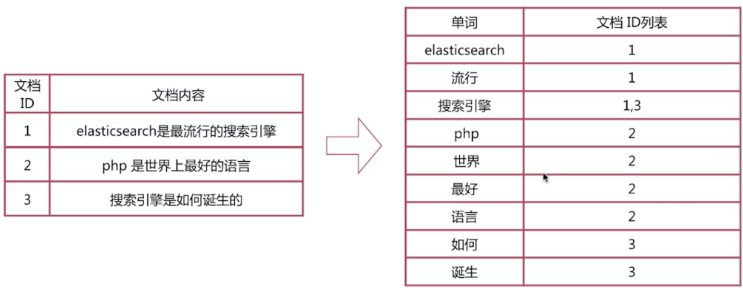
倒排索引步骤:
- 数据根据词条进行分词,同时记录文档索引位置
- 将词条相同的数据化进行合并
- 对词条进行排序
搜索的过程:
- 先将搜索词语进行分词,分词后再倒排索引列表查询文档位置(docId)。根据docId查询文档数据。
到排索引相对正排索引的区别:
- 正排索引: 通过正排索引表的id(索引)找到对应的字段(文章)
key --- to --->word
- 倒排索引: 通过倒排索引表的 字段(单词) 找到对应的文章的id
word--- to --->key
elasticsearch核心概念
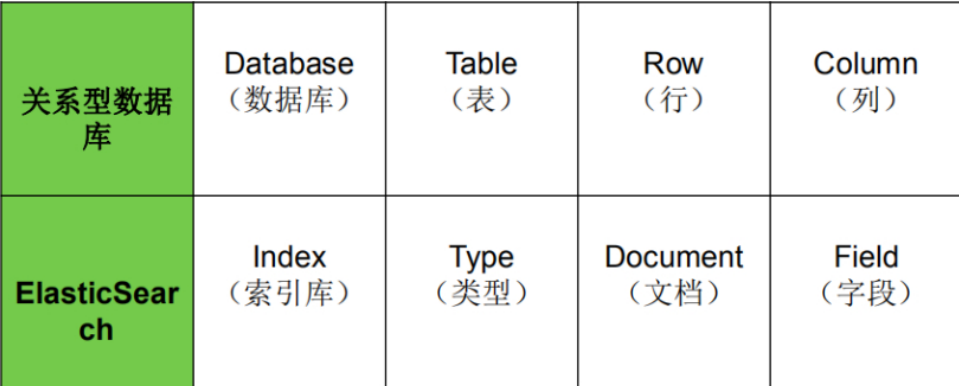
es对照数据库
索引
- 与’‘库’'类似
- 一个索引就是拥有几分相识特征的文档集合
- 我们对文档进行增删改查都要用到这个索引
- 在一个集群中,可以有任意多个索引
类型(Type)
- 与’‘表’'类似
- 在索引中存放的是文档,对于一个索引来说,可以有多个不同的文档,
- 对于文档来说,如果某写文档具有相同的结构, 则可以给他们定义相同的类型
本,类型发生了不同的变化
| 版本 |
Type |
| 5.x |
支持多种type |
| 6.x |
只能有一种type |
| 7.x |
默认不再支持自定义索引类型(默认类型为:_doc) |
| 8.x |
默认类型为:_doc |
文档(Document)
- 与 ‘‘行数据’’ 类似
- 也就是一条数据
- 以JSON格式存储
字段(Field)
- 相当于是数据表的字段
- 对文档数据根据不同属性进行的分类标识。
映射(Mapping)
- 与"字段类型" \ “默认值” \是否被索引相关
- 处理数据的方式和规则方面做一些限制
Elasticsearch 基础功能
分词器
-
官方提供的分词器有这么几种: Standard、Letter、Lowercase、Whitespace、UAX URL Email、Classic、Thai等
-
中文分词器可以使用第三方的比如IK分词器
-
功能:通过分词器可以查看每个不同的分词器的分词粒度,来决定使用的分词器
分词器的使用
1
2
3
4
5
6
7
8
9
10
11
12
13
14
15
16
17
18
19
20
21
22
23
24
25
26
27
28
29
30
31
32
33
34
35
36
37
38
39
40
41
42
43
44
45
46
47
48
49
50
51
52
53
54
55
56
57
58
59
60
61
62
63
64
65
66
67
68
69
70
71
72
73
74
75
76
77
| POST _analyze
{
"analyzer": "ik_smart", # 分词器类型
"text": "我是中国人"
}
结果:
{
"tokens": [
{
"token": "我",
"start_offset": 0,
"end_offset": 1,
"type": "CN_CHAR",
"position": 0
},
{
"token": "是",
"start_offset": 1,
"end_offset": 2,
"type": "CN_CHAR",
"position": 1
},
{
"token": "中国人",
"start_offset": 2,
"end_offset": 5,
"type": "CN_WORD",
"position": 2
}
]
}
POST _analyze
{
"analyzer": "ik_max_word",
"text": "我是中国人"
}
结果:
{
"tokens": [
{
"token": "我",
"start_offset": 0,
"end_offset": 1,
"type": "CN_CHAR",
"position": 0
},
{
"token": "是",
"start_offset": 1,
"end_offset": 2,
"type": "CN_CHAR",
"position": 1
},
{
"token": "中国人",
"start_offset": 2,
"end_offset": 5,
"type": "CN_WORD",
"position": 2
},
{
"token": "中国",
"start_offset": 2,
"end_offset": 4,
"type": "CN_WORD",
"position": 3
},
{
"token": "国人",
"start_offset": 3,
"end_offset": 5,
"type": "CN_WORD",
"position": 4
}
]
}
|
索引操作
- 类型: 可以看做一个数据库,但是 它默认使用的类型为_doc,也可以看作表
创建索引
1
2
3
4
5
6
7
8
| PUT /my_index
结果:
{
"acknowledged" : true,
"shards_acknowledged" : true,
"index" : "my_index"
}
|
查看所有索引
GET /_cat/indices?v
查看单个索引
1
2
3
4
5
6
7
8
9
10
11
12
13
14
15
16
17
18
19
20
21
22
23
24
25
26
27
| GET /my_index
结果:
{
"my_index": {
"aliases": {},
"mappings": {},
"settings": {
"index": {
"routing": {
"allocation": {
"include": {
"_tier_preference": "data_content"
}
}
},
"number_of_shards": "1",
"provided_name": "my_index",
"creation_date": "1693294063006",
"number_of_replicas": "1",
"uuid": "kYMuXUZQRumMGqHoV0fDJw",
"version": {
"created": "8050099"
}
}
}
}
}
|
删除索引
1
2
3
4
5
| DELETE /my_index
结果:
{
"acknowledged" : true
}
|
文档操作
创建文档
1
2
3
4
5
6
7
8
9
10
11
12
13
14
15
16
17
18
19
20
21
22
23
| PUT /my_index/_doc/1
{
"title": "小米手机",
"category": "小米",
"images": "http://www.gulixueyuan.com/xm.jpg",
"price": 3999
}
返回结果:
{
"_index": "my_index",
"_id": "1",
"_version": 3,
"_seq_no": 2,
"_primary_term": 1,
"found": true,
"_source": {
"title": "小米手机",
"category": "小米",
"images": "http://www.gulixueyuan.com/xm.jpg",
"price": 3999
}
}
|
查看文档
1
2
3
4
5
6
7
8
9
10
11
12
13
14
15
16
17
| GET /my_index/_doc/1
结果:
{
"_index" : "my_index",
"_type" : "_doc",
"_id" : "1",
"_version" : 1,
"_seq_no" : 0,
"_primary_term" : 1,
"found" : true,
"_source" : {
"title" : "小米手机",
"category" : "小米",
"images" : "http://www.gulixueyuan.com/xm.jpg",
"price" : 3999
}
}
|
查询所有文档
1
2
3
4
5
6
7
8
9
10
11
12
13
14
15
16
17
18
19
20
21
22
23
24
25
26
27
28
29
30
31
32
33
| GET /my_index/_search
结果:
{
"took": 941,
"timed_out": false,
"_shards": {
"total": 1,
"successful": 1,
"skipped": 0,
"failed": 0
},
"hits": {
"total": {
"value": 1,
"relation": "eq"
},
"max_score": 1,
"hits": [
{
"_index": "my_index",
"_id": "1",
"_score": 1,
"_source": {
"title": "小米手机",
"category": "小米",
"images": "http://www.gulixueyuan.com/xm.jpg",
"price": 3999
}
}
]
}
}
|
修改文档
1
2
3
4
5
6
7
| PUT /my_index/_doc/1
{
"title": "小米手机",
"category": "小米",
"images": "http://www.gulixueyuan.com/xm.jpg",
"price": 4500
}
|
修改局部属性
语法:
POST /{索引名称}/_update/{docId}
{
“doc”: {
“属性”: “值”
}
}
只能使用POST请求方式
1
2
3
4
5
6
| POST /my_index/_update/1
{
"doc": {
"price": 4500
}
}
|
删除文档
1
2
3
4
5
6
7
8
9
10
11
12
13
14
15
| DELETE /my_index/_doc/1
结果:
{
"_index": "my_index",
"_id": "1",
"_version": 5,
"result": "deleted",
"_shards": {
"total": 2,
"successful": 1,
"failed": 0
},
"_seq_no": 6,
"_primary_term": 1
}
|
映射mapping
- 设置文档字段的限制
- 比如设置为text,则默认会进行分词和索引
- 设置为keywords则不会进行分词
查看映射
1
2
3
4
5
6
7
8
9
10
11
12
13
14
15
16
17
18
19
20
21
22
23
24
25
26
27
28
29
30
31
32
33
34
35
36
37
38
39
40
| GET /my_index/_mapping
结果:
{
"my_index": {
"mappings": {
"properties": {
"category": {
"type": "text",
"fields": {
"keyword": {
"type": "keyword",
"ignore_above": 256
}
}
},
"images": {
"type": "text",
"fields": {
"keyword": {
"type": "keyword",
"ignore_above": 256
}
}
},
"price": {
"type": "long"
},
"title": {
"type": "text",
"fields": {
"keyword": {
"type": "keyword",
"ignore_above": 256
}
}
}
}
}
}
}
|
动态映射
- 当创建索引时,如果没设置映射,则会默认进行动态映射
| 数据 |
对应的类型 |
| null |
字段不添加 |
| true|flase |
boolean |
| 字符串 |
text |
| 数值 |
long |
| 小数 |
float |
| 日期 |
date |
静态映射
1
2
3
4
5
6
7
8
9
10
11
12
13
14
15
16
17
18
19
20
21
22
23
24
25
26
27
28
29
30
31
32
33
34
35
36
37
38
39
40
| #删除原创建的索引
DELETE /my_index
#创建索引,并同时指定映射关系和分词器等。
PUT /my_index
{
"mappings": {
"properties": {
"title": {
"type": "text",
"index": true,
"store": true,
"analyzer": "ik_max_word",
"search_analyzer": "ik_smart"
},
"category": {
"type": "keyword",
"index": true,
"store": true
},
"images": {
"type": "keyword",
"index": true,
"store": true
},
"price": {
"type": "integer",
"index": true,
"store": true
}
}
}
}
结果:
{
"acknowledged" : true,
"shards_acknowledged" : true,
"index" : "my_index"
}
|
type 分类
- 字符串:text(支持分词)和 keyword(不支持分词)。
- text:该类型被用来索引长文本,在创建索引前会将这些文本进行分词,转化为词的组合,建立索引;允许es来检索这些词,text类型不能用来排序和聚合。
- keyword:该类型不能分词,可以被用来检索过滤、排序和聚合,keyword类型不可用text进行分词模糊检索。
- 数值型:long、integer、short、byte、double、float
- 日期型:date
- 布尔型:boolean
- 特殊数据类型:nested
nested 介绍
-
在es中, 如果一个数组存储多个对象, 当进行文档条件查询时, 如果根据数组内部的对象的字段进行条件查询, 默认会对数组的对象进行压缩存储.
-
即,相同字段存储在同一个属性中, 这样在根据某一个对象进行条件查询时, 实际上是根据声音对象的字段进行条件查询, 这样就会导致数组对象的条件查询失效.
-
nested 则是来解决这个问题的:
- nested:类型是一种特殊的对象object数据类型(specialised version of the object datatype ),允许对象数组彼此独立地进行索引和查询。
所以在进行数组对象的条件查询之前,应该先将该数组对象的type设置为nested.
DSL高级查询
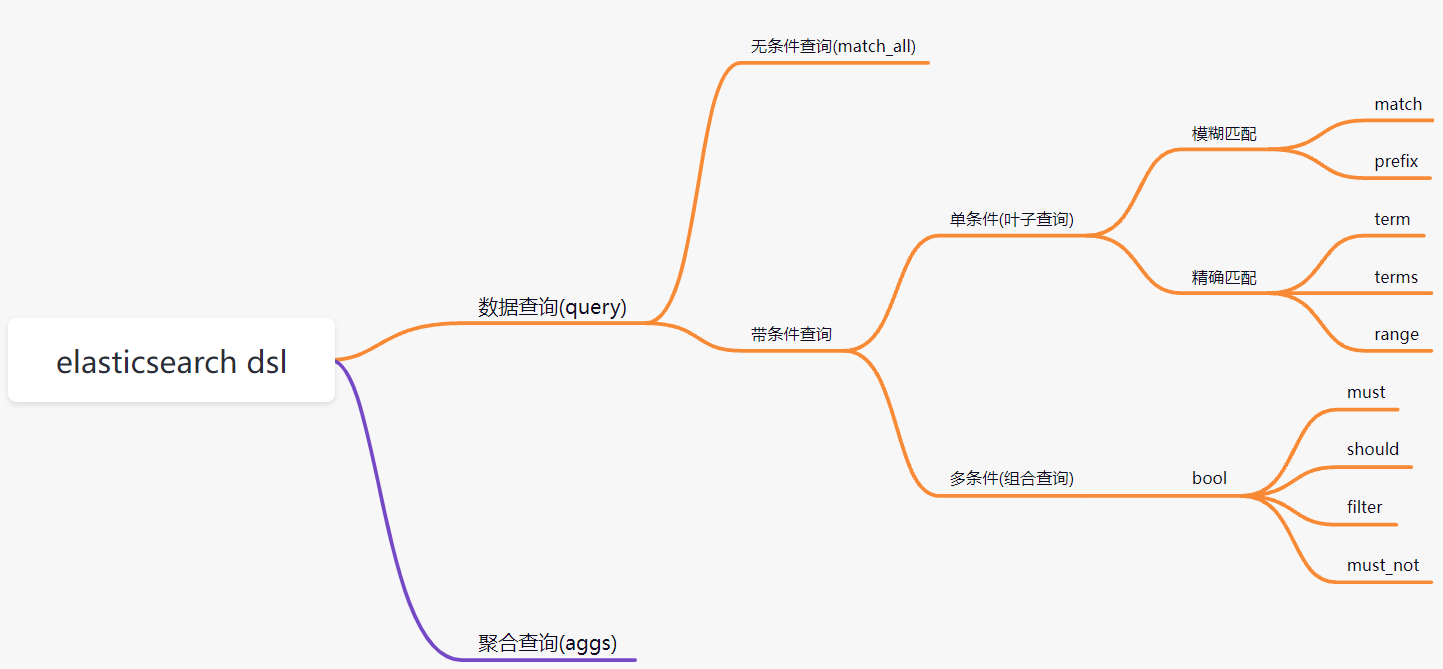
- Query DSL概述: Domain Specific Language(领域专用语言),Elasticsearch提供了基于JSON的DSL来定义查询。
DSL查询
查询所有文档
match_all:
1
2
3
4
5
6
| POST /my_index/_search
{
"query": {
"match_all": {}
}
}
|
匹配查询(match)
match:
1
2
3
4
5
6
7
8
| POST /my_index/_search
{
"query": {
"match": {
"title": "华为智能手机"
}
}
}
|
多字段匹配
1
2
3
4
5
6
7
8
9
| POST /my_index/_search
{
"query": {
"multi_match": {
"query": "华为智能手机",
"fields": ["title","category"]
}
}
}
|
关键字精确查询
term:关键字不会进行分词
1
2
3
4
5
6
7
8
9
10
| GET /my_index/_search
{
"query": {
"term": {
"category": {
"value": "华为"
}
}
}
}
|
多关键字精确查询
1
2
3
4
5
6
7
8
9
10
11
| GET /my_index/_search
{
"query": {
"terms": {
"category": [
"华为",
"vivo"
]
}
}
}
|
范围查询
范围查询使用range。
gte: 大于等于lte: 小于等于gt: 大于lt: 小于
指定返回字段
query同级增加_source进行过滤。
1
2
3
4
5
6
7
8
9
| GET /my_index/_search
{
"query": {
"match": {
"title": "手机"
}
},
"_source": ["title","price"]
}
|
组合查询(多条件查询)
bool 各条件之间有and,or或not的关系
must: 各个条件都必须满足,所有条件是and的关系should: 各个条件有一个满足即可,即各条件是or的关系must_not: 不满足所有条件,即各条件是not的关系filter: 与must效果等同,但是它不计算得分,效率更高点。 得分: 查询出的文档与查询语句的关联性大小
must
各个条件都必须满足,所有条件是and的关系
1
2
3
4
5
6
7
8
9
10
11
12
13
14
15
16
17
18
19
20
21
22
| POST /my_index/_search
{
"query": {
"bool": {
"must": [
{
"match": {
"title": "华为"
}
},
{
"range": {
"price": {
"gte": 3000,
"lte": 5400
}
}
}
]
}
}
}
|
should
各个条件有一个满足即可,即各条件是or的关系
1
2
3
4
5
6
7
8
9
10
11
12
13
14
15
16
17
18
19
20
21
22
| POST /my_index/_search
{
"query": {
"bool": {
"should": [
{
"match": {
"title": "华为"
}
},
{
"range": {
"price": {
"gte": 3000,
"lte": 5000
}
}
}
]
}
}
}
|
如果should和must同时存在,他们之间是and关系:
1
2
3
4
5
6
7
8
9
10
11
12
13
14
15
16
17
18
19
20
21
22
23
24
25
26
27
28
29
30
31
32
33
34
35
36
37
| POST /my_index/_search
{
"query": {
"bool": {
"should": [
{
"match": {
"title": "华为"
}
},
{
"range": {
"price": {
"gte": 3000,
"lte": 5000
}
}
}
],
"must": [
{
"match": {
"title": "华为"
}
},
{
"range": {
"price": {
"gte": 3000,
"lte": 5000
}
}
}
]
}
}
}
|
must_not
不满足所有条件,即各条件是not的关系
1
2
3
4
5
6
7
8
9
10
11
12
13
14
15
16
17
18
19
20
21
22
| POST /my_index/_search
{
"query": {
"bool": {
"must_not": [
{
"match": {
"title": "华为"
}
},
{
"range": {
"price": {
"gte": 3000,
"lte": 5000
}
}
}
]
}
}
}
|
filter
与must效果等同,但是它不计算得分,效率更高点。
_score的分值为0 在Elasticsearch中,_score 字段代表每个文档的相关性分数(relevance score)。这个分数用于衡量一个文档与特定查询的匹配程度,它是基于搜索查询的条件和文档的内容来计算的。相关性分数越高,表示文档与查询的匹配度越高,排名也越靠前。
1
2
3
4
5
6
7
8
9
10
11
12
13
14
| POST /my_index/_search
{
"query": {
"bool": {
"filter": [
{
"match": {
"title": "华为"
}
}
]
}
}
}
|
聚合查询
聚合允许使用者对es文档进行统计分析,类似与关系型数据库中的group by,当然还有很多其他的聚合,例如取最大值、平均值等等。
- 对query查询出的文档进行统计分析:
max min avg sum stats terms 等
stats: 计算出:max min avg sumterms: 类似group by
max
1
2
3
4
5
6
7
8
9
10
11
12
13
14
| POST /my_index/_search
{
"query": {
"match_all": {}{}
},
"size": 0,
"aggs": {
"max_price": {
"max": {
"field": "price"
}
}
}
}
|
min
1
2
3
4
5
6
7
8
9
10
11
12
13
14
| POST /my_index/_search
{
"query": {
"match_all": {}
},
"size": 0,
"aggs": {
"min_price": {
"min": {
"field": "price"
}
}
}
}
|
avg
1
2
3
4
5
6
7
8
9
10
11
12
13
14
| POST /my_index/_search
{
"query": {
"match_all": {}
},
"size": 0,
"aggs": {
"avg_price": {
"avg": {
"field": "price"
}
}
}
}
|
sum
1
2
3
4
5
6
7
8
9
10
11
12
13
14
| POST /my_index/_search
{
"query": {
"match_all": {}
},
"size": 0,
"aggs": {
"sum_price": {
"sum": {
"field": "price"
}
}
}
}
|
stats
1
2
3
4
5
6
7
8
9
10
11
12
13
14
| POST /my_index/_search
{
"query": {
"match_all": {}
},
"size": 0,
"aggs": {
"stats_price": {
"stats": {
"field": "price"
}
}
}
}
|
terms
查询出来的是多个文档的集合,每个数组内部最多有size个文档
1
2
3
4
5
6
7
8
9
10
11
12
13
14
15
| POST /my_index/_search
{
"query": {
"match_all": {}
},
"size": 0,
"aggs": {
"groupby_category": {
"terms": {
"field": "category",
"size": 10
}
}
}
}
|
还可以对桶继续计算:计算每个品牌对应的平均值是多少!
1
2
3
4
5
6
7
8
9
10
11
12
13
14
15
16
17
18
19
20
21
22
| POST /my_index/_search
{
"query": {
"match_all": {}
},
"size": 0,
"aggs": {
"groupby_category": {
"terms": {
"field": "category",
"size": 10
},
"aggs": {
"avg_price": {
"avg": {
"field": "price"
}
}
}
}
}
}
|
top_hit
查询桶中顶部的详细信息
1
2
3
4
5
6
7
8
| "name":{
"top_hit":{
"size": 10,
"range":{
"order":"desc"
}
}
}
|
排序
1
2
3
4
5
6
7
8
9
10
11
12
13
14
15
16
17
18
19
20
21
22
23
24
25
26
| POST /my_index/_search
{
"query": {
"bool": {
"must": [
{
"match": {
"title": "华为"
}
}
]
}
},
"sort": [
{
"price": {
"order": "asc"
}
},
{
"_score": { # 分数
"order": "desc"
}
}
]
}
|
分页查询
分页的两个关键属性:from、size。
from: 当前页的起始索引,默认从0开始。 from = (pageNum - 1) * sizesize: 每页显示多少条
1
2
3
4
5
6
7
8
| POST /my_index/_search
{
"query": {
"match_all": {}
},
"from": 0,
"size": 2
}
|
高亮显示
无检索不高亮
1
2
3
4
5
6
7
8
9
10
11
12
13
14
15
16
| # 检索数据
GET /my_index/_search
{
"query": {
"match": {
"title": "华为手机"
}
},
"highlight": {
"fields": {
"title": {}
},
"pre_tags": ["<font color:#e4393c>"],
"post_tags": ["</font>"]
}
}
|
Java Api操作ES
1. 创建项目es-test
2. 导入依赖
1
2
3
4
5
6
7
8
9
10
11
12
13
14
15
16
17
18
19
20
21
22
23
24
25
26
27
28
29
30
31
32
33
34
35
36
37
38
39
40
41
42
43
44
45
| <?xml version="1.0" encoding="UTF-8"?>
<project xmlns="http://maven.apache.org/POM/4.0.0"
xmlns:xsi="http://www.w3.org/2001/XMLSchema-instance"
xsi:schemaLocation="http://maven.apache.org/POM/4.0.0 http://maven.apache.org/xsd/maven-4.0.0.xsd">
<modelVersion>4.0.0</modelVersion>
<groupId>online.zorange</groupId>
<artifactId>es-test</artifactId>
<version>1.0-SNAPSHOT</version>
<parent>
<groupId>org.springframework.boot</groupId>
<artifactId>spring-boot-parent</artifactId>
<version>3.0.5</version>
<relativePath></relativePath>
</parent>
<properties>
<maven.compiler.source>17</maven.compiler.source>
<maven.compiler.target>17</maven.compiler.target>
<project.build.sourceEncoding>UTF-8</project.build.sourceEncoding>
</properties>
<dependencies>
<dependency>
<groupId>org.springframework.boot</groupId>
<artifactId>spring-boot-starter-web</artifactId>
</dependency>
<dependency>
<groupId>org.springframework.boot</groupId>
<artifactId>spring-boot-starter-test</artifactId>
</dependency>
<dependency>
<groupId>org.springframework.boot</groupId>
<artifactId>spring-boot-starter-data-elasticsearch</artifactId>
</dependency>
<dependency>
<groupId>org.projectlombok</groupId>
<artifactId>lombok</artifactId>
<version>1.18.16</version>
</dependency>
</dependencies>
</project>
|
3. 编写启动类和配置文件
配置es的地址
1
2
3
4
5
6
| server:
port: 9000
spring:
elasticsearch:
uris: test.zorange.online:9200
|
4.编写实体类,用于es操作
使用注解
- 定义索引:
@Document(indexName = "person")
- 标名id:
@Id
- 设置mapping:
@Field(type = FieldType.Text,store = true,index = true)
1
2
3
4
5
6
7
8
9
10
11
12
13
14
15
16
17
18
19
20
21
22
23
24
25
26
27
28
29
30
31
32
33
34
35
| package online.zorange.entity;
import jdk.jfr.DataAmount;import lombok.AllArgsConstructor;
import lombok.Data;
import lombok.NoArgsConstructor;
import org.springframework.data.annotation.Id;
import org.springframework.data.elasticsearch.annotations.Document;
import org.springframework.data.elasticsearch.annotations.Field;
import org.springframework.data.elasticsearch.annotations.FieldType;
import java.io.Serializable;
@NoArgsConstructor
@AllArgsConstructor
@Data
@Document(indexName = "person")
public class Person implements Serializable {
@Id
private Long id;
@Field(type = FieldType.Text,store = true,index = true)
private String name;
@Field(type = FieldType.Keyword)
private String password;
@Field(type = FieldType.Keyword)
private Long age;
@Field(type = FieldType.Text,store = true,index=true)
private String address;
}
|
5. 编写Resipositry接口
- 实现
CrudRepository<Entity,Retun>
1
2
3
4
5
6
7
8
9
10
11
12
13
14
15
16
17
18
19
20
21
| package online.zorange.repository;
import online.zorange.entity.Person;
import org.springframework.data.repository.CrudRepository;
import org.springframework.stereotype.Repository;
import java.util.List;
@Repository
public interface PersonRepository extends CrudRepository<Person,Long> {
List<Person> findByAddressContains(String address);
List<Person> findByPasswordAndNameContains(String password,String name);
}
|
简单操作 respositry
-
- respositry初始提供了 三个方法:
findById findAllByIds findAll
-
- 扩展简单查询:
-
- 查找以find开头
-
- 条件前加By ,后接条件字段
-
与 用And 或 用 or, 范围用Between
-
- 匹配查询接
Contains
复杂查询
1
2
| @Autowired
ElasticsearchClient elasticsearchClient;
|
- 编写查询
reques
1
2
3
4
5
6
7
8
| SearchRequest searchRequest=SearchRequest.of(sr->sr.index("my_index").
query(q->q.match(v->v.field("title").query("oppo"))));
SearchResponse<Object> search = elasticsearchClient.search(searchRequest, Object.class);
List<Hit<Object>> hits = search.hits().hits();
System.out.println("hits = " + hits);
|